
Why "Top 10" Lists Failed You (And How to Actually Choose)
You have likely spent the last week staring at comparison tables that tell you everything about a machine's theoretical maximums and nothing about its ability to pay for itself. "Top 10" lists fail because they treat industrial manufacturing equipment like consumer electronics, ranking units by features-per-dollar rather than reliability-per-shift. A workshop does not need a generic "winner" selected by a tech blogger; it needs a machine that aligns with specific constraints regarding budget cadence, daily throughput, and material finishes. Instead of looking for a ranking, you must build a requirements matrix that maps your production needs—specifically material types and volume—to machine capabilities.
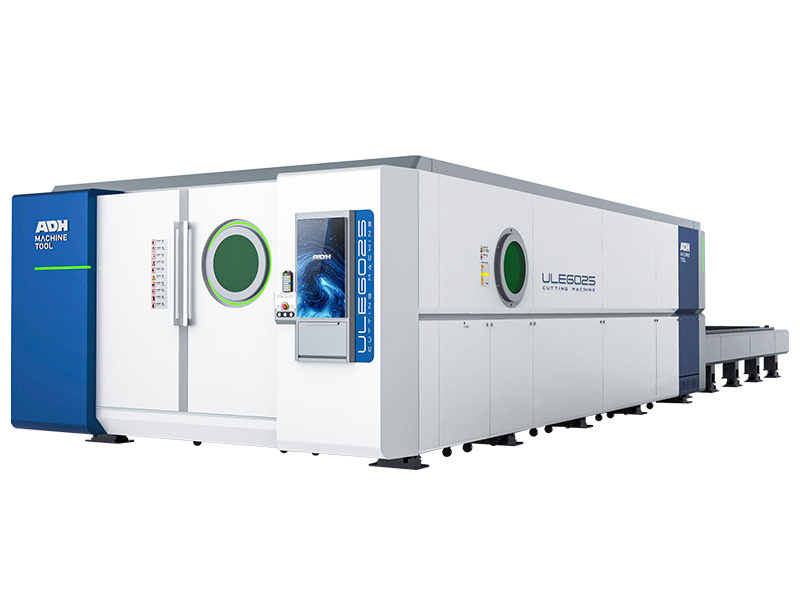
For example, if your priority is high metal cutting precision and long-term production stability, you can explore industrial-grade solutions like the Single Table Fiber Laser Cutting Machine designed for streamlined throughput and professional environments.
The Spec Sheet Trap: Why Wattage Is the Least Important Metric for a Rush Job
Common Mistakes in Workshop Equipment Prioritization
- Prioritizing peak wattage over process stability is the most expensive mistake workshop owners make.
- High wattage is meaningless if the machine suffers from gantry misalignment or requires heavy post-processing.
- Wattage only determines cutting thickness capability, not profitability.
- Focus on hidden "downtime drivers" instead of tube power specifications.
- Key downtime drivers include nozzle and lens cleanliness, servo maintenance intervals, and cooling airflow consistency.
- For revenue-focused operations, critical performance metrics are acceleration and kerf width consistency.
- A well-tuned 60W machine can outperform a poorly calibrated 100W model.
- Unstable machines waste material and time, making additional wattage counterproductive.
If consistent uptime and precision are critical for your operation, reviewing professional-grade systems such as the Dual-use Fiber Laser Cutting Machine With Cover can help ensure cutting uniformity across longer production shifts.
The "Time-to-First-Cut" Reality: Distinguishing Hobby Toys from Revenue Generators
Optimized Version
"Time-to-First-Cut" (TTFC) measures how long it takes from unboxing a machine to producing the first usable part. Hobbyist models often emphasize this metric, using proprietary and simplified software to get users cutting within an hour. While this accessibility lowers the entry barrier, it also limits long-term growth. These “plug-and-play” systems typically lack the integration and automation needed for a professional CAD-to-CAM workflow, requiring manual adjustments for each job.
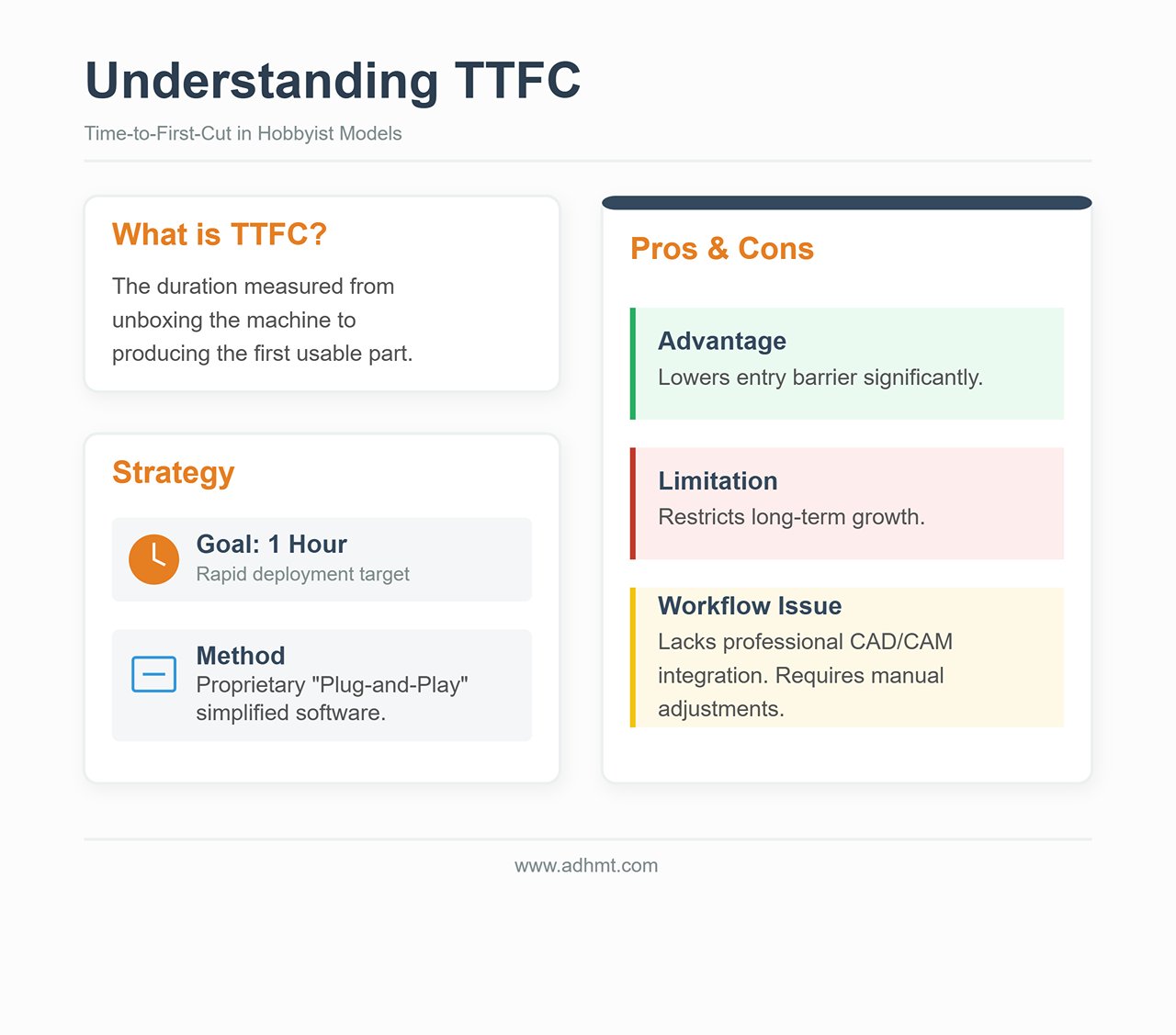
In contrast, a true revenue-generating machine is defined not by its TTFC but by how seamlessly it integrates into existing production processes. Industrial-grade units may demand longer initial setup—such as exhaust compliance, chiller installation, and safety interlocks—but once configured, their "Time-to-Second-Cut" approaches zero. This efficiency depends on software compatibility that supports batch processing, repeatable accuracy, and minimal recalibration.
A machine with a low TTFC but insufficient rigidity or weak software architecture is suitable for prototyping, not production. Sustained return on investment comes from throughput, consistency, and tolerance control—factors that endure well beyond the unboxing stage.
For those optimizing professional workflows, checking technical specifications or downloadable brochures helps visualize the machine configuration and integration required for higher-volume output.
Phase 1: The Hard Filters (Rule Out 90% of Machines Now)
Most buyers start their search by looking at laser wattage and price tags. This is the fastest way to buy a machine that becomes an expensive paperweight. The most critical factors in selecting a laser cutter have nothing to do with the machine’s specifications and everything to do with the physical constraints of your workspace.
Before you look at a single brand, you must apply a set of "hard filters." These are binary constraints: if a machine does not fit these criteria, it is not a candidate. It is a liability. By applying these filters, you will eliminate 90% of the market, leaving you with the only units that can actually function in your specific environment.
The Ventilation Veto: No Outdoor Venting Path Means No CO2 (Here’s What’s Left)
The first filter is atmospheric. Laser cutting is a thermal process that vaporizes material. When you cut wood, acrylic, or leather, you are not just creating dust; you are generating volatile organic compounds (VOCs), carbon monoxide, and various carcinogens. If you cut PVC (which you shouldn't), you are generating hydrochloric acid gas that will destroy your lungs and corrode the machine’s electronics within weeks.
The Hard Rule: If you cannot run a 4-inch or 6-inch duct from the machine to the outdoors, you cannot buy a CO2 laser for production purposes.
Many manufacturers sell "fume extractors" or recirculating filtration units as a workaround for windowless rooms. For a hobbyist engraving an occasional coaster, these are adequate. For a workshop running production, they are a financial trap.
- The Saturation Problem: Cutting acrylic and wood fills HEPA and activated carbon filters rapidly. In a production environment, you may need to replace expensive filter cartridges weekly to maintain safe air quality. This adds thousands of dollars to your annual operating costs.
- The Physics of Flow: Recirculating units rarely provide the cubic feet per minute (CFM) airflow required to keep the optics clean. Without strong negative pressure venting outside, smoke lingers in the chassis, settling on mirrors and lenses. This degrades beam quality, reduces cutting power, and cracks expensive optics.
If you have no outdoor venting path, your only viable options are low-power diode lasers or fiber lasers dedicated strictly to metal marking, such as the Single Table Fiber Laser Cutting Machine, which help you maintain air safety and dependable airflow quality.
The Electrical Surprise: Why Your 110V Outlet Might Kill Your Production Speed
The second filter is electrical capacity. In North America, the standard 110V/15A residential outlet provides a theoretical maximum of 1,800 watts. However, electrical code and safety standards dictate a continuous load limit of 80%, or roughly 1,440 watts.
New buyers often look at a laser’s rating—for example, a "100W" laser tube—and assume it fits easily within that limit. This is a misunderstanding of power consumption versus output power. A laser cutter is a system, not a single component.
- The Aggregate Load: You are not just powering the laser source. You are powering the stepper motors, the controller, the water chiller (essential for glass tubes), the air assist pump, and the exhaust fan.
- The Voltage Drop: When the chiller compressor kicks on while the laser is firing at high power, the sudden current draw can cause a momentary voltage drop on a shared 110V circuit.
If your workshop only has standard residential 110V outlets and you cannot install a dedicated circuit, you are severely limited. Running a high-wattage machine on a shared circuit leads to "brownouts" where the laser power fluctuates, resulting in cuts that don't go all the way through or inconsistent engraving depths.
The Hard Rule: If you cannot install a dedicated 20A circuit or a 220V line, you must rule out high-power industrial CO2 platforms and large-format fiber lasers. You are restricted to desktop units or entry-level floor models where the chiller and exhaust are integrated or low-draw.
The Bed Size Trap: Why "Bigger" Often Means "Slower" and "Less Precise"
The marketing logic suggests that a 48" x 36" bed is inherently better than a 24" x 12" bed because it offers "more potential." In a workshop, potential is irrelevant; throughput is king.
Large beds require large gantries (the bridge that moves the laser head). Large gantries are heavy.
- Inertia vs. Detail: A heavy gantry requires more force to accelerate and decelerate. If you are engraving fine text or detailed graphics, the machine must change direction thousands of times per minute. A large, heavy machine will struggle to do this quickly without vibration, known as "ringing" or "wobble," which shows up as wavy lines in your work.
- The Speed Penalty: To maintain precision with a heavy gantry, the machine often has to run slower. A smaller machine with a lightweight gantry can often engrave a batch of items 30% faster than a large machine simply because it can accelerate faster between cuts.
The Hard Rule: Do not buy a bed size for "someday" projects. If 95% of your work fits on a 12x20 inch sheet, a 4x8 foot machine will actually hurt your business. It will consume more floor space, use more power, and likely produce lower-quality engravings at a slower pace. Only buy the large bed if your primary revenue stream comes from cutting full sheets of material.
Material Reality: Why Your Client's Request Dictates the Laser Source (CO2 vs. Fiber vs. Diode)
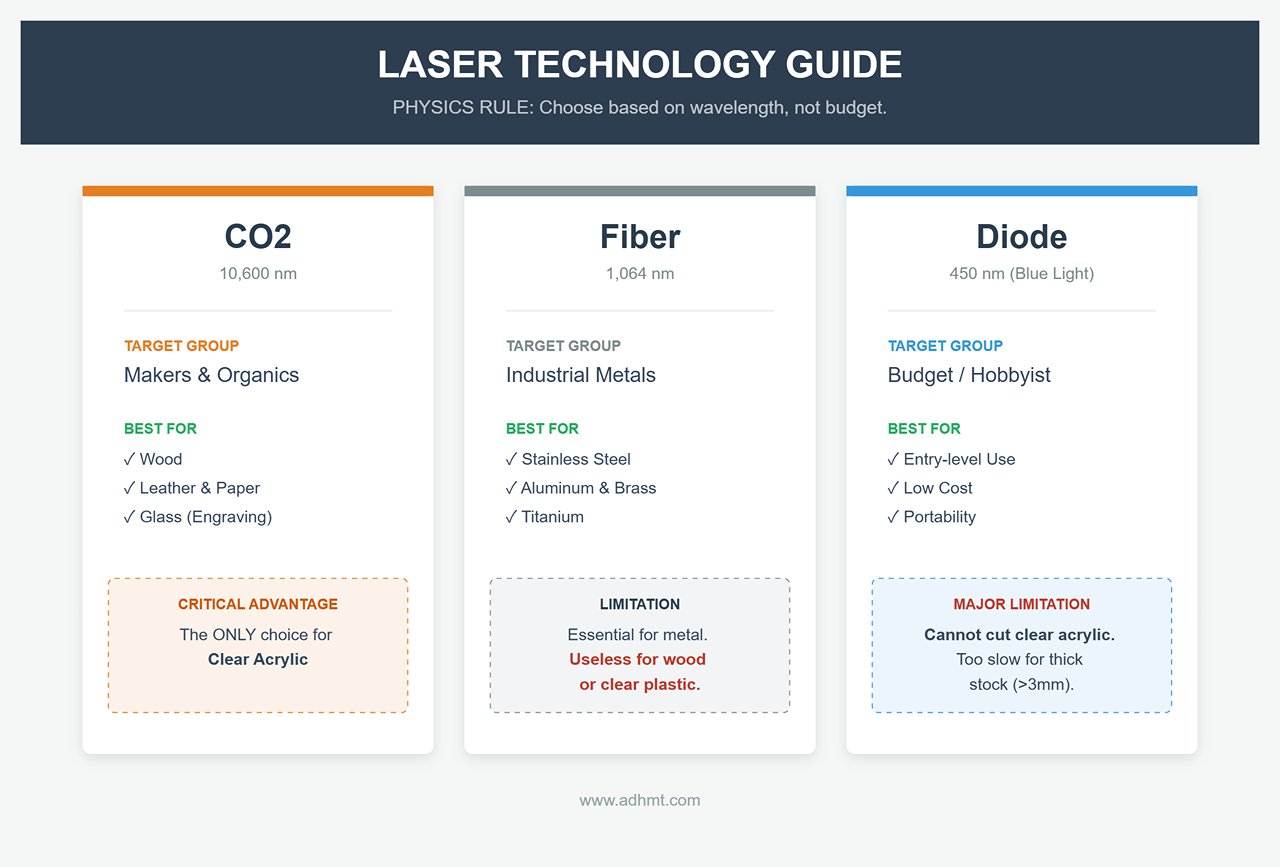
Finally, you cannot choose a laser source based on budget; you must choose it based on physics. The wavelength of the laser beam determines what materials it interacts with. No amount of power can overcome the wrong wavelength.
- CO2 Lasers (10,600 nm): The workhorse for makers. This wavelength is absorbed perfectly by organic materials.
- Must-haves for: Wood, acrylic (clear and colored), leather, paper, glass (engraving only).
- The Hard Filter: If your clients need clear acrylic trophies or architectural models, you must buy a CO2 laser. A fiber or diode laser will pass right through clear acrylic without marking it.
- Fiber Lasers (1,064 nm): The industrial standard for metal.
- Must-haves for: Stainless steel, aluminum, brass, copper, titanium.
- The Hard Filter: If your business model relies on cutting metal parts, a CO2 laser is the wrong tool. While high-power (150W+) CO2 lasers can cut thin metal with oxygen assist, the edge quality and speed are inferior to even an entry-level fiber laser. If you need to engrave clear plastics or wood, the fiber laser is useless; it will burn the wood uncontrollably or fail to mark the plastic.
- Diode Lasers (450 nm): The visible blue light spectrum.
- Must-haves for: Budget constraints and extreme portability.
- The Hard Filter: Diode lasers have poor absorption in clear acrylic (blue light passes through) and are incredibly slow for cutting anything thicker than 3mm plywood. If your business depends on speed or cutting thick stock, rule out diode lasers immediately.
Before moving to the specific machine recommendations in the next section, write down your three primary materials. If they are metal, you are looking for Fiber. If they are clear acrylic and wood, you are looking for CO2. There is no crossover machine that does both perfectly without costing as much as a small house.
Phase 2: The Software Dealbreaker
Most buyers obsess over tube wattage and bed size, treating the control software as an afterthought—a mere accessory included in the box. This is the single most expensive mistake you can make. In a professional workshop, hardware is only as capable as the software driving it. A 150W CO2 laser with a clumsy, closed-loop software stack is not a tool; it is a bottleneck.
Before you commit to a machine, you must audit the digital ecosystem it forces upon you. If the software workflow is broken, the machine’s speed is irrelevant.
Why "LightBurn Compatible" Is Non-Negotiable for Professional Work
In the laser industry, LightBurn has evolved from a third-party utility into the de facto operating system for professional fabrication. It functions as both the CAM (Computer-Aided Manufacturing) software—where you set speeds, powers, and pathing—and the machine control interface.
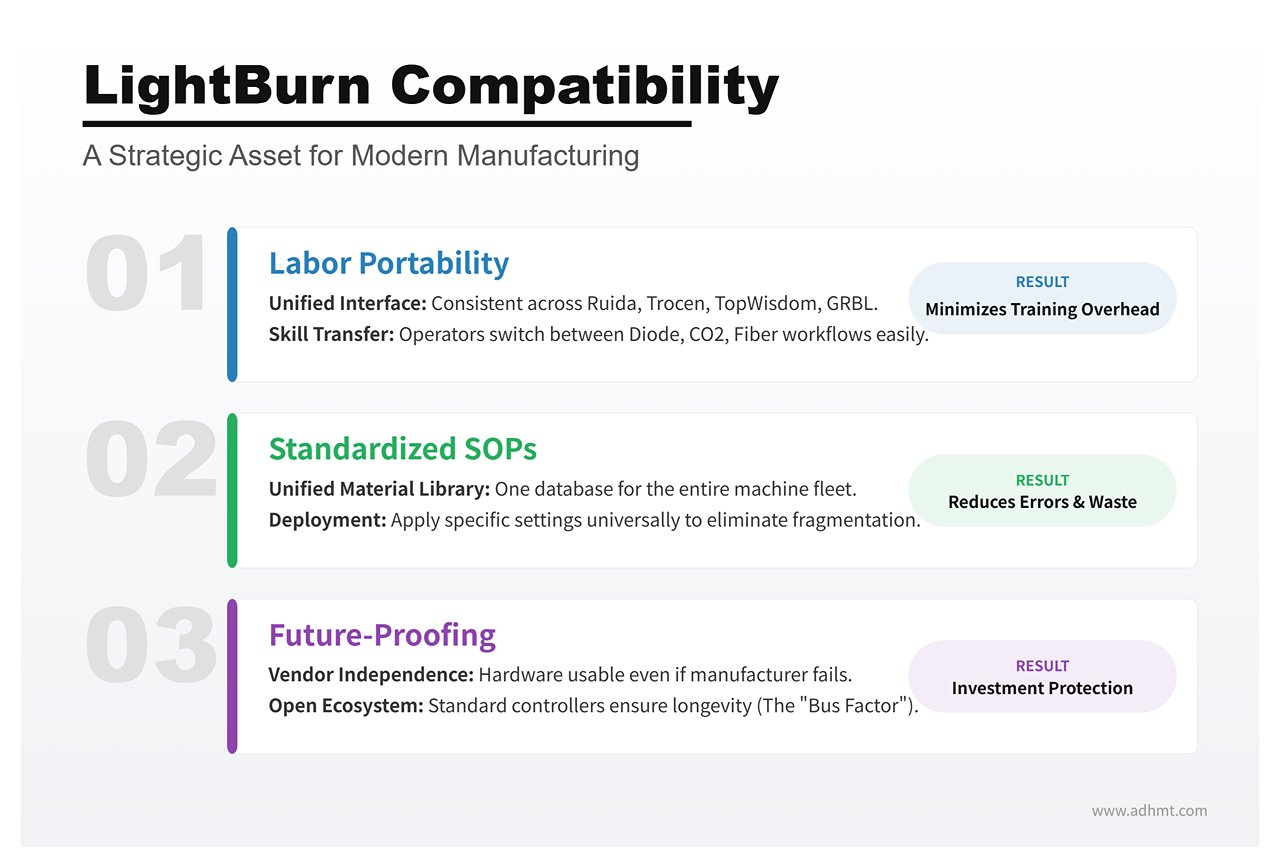
For a workshop, "LightBurn Compatibility" is not a preference; it is a strategic asset for three reasons:
- Labor Portability: LightBurn unifies the interface across disparate hardware. It supports Ruida, Trocen, TopWisdom, and GRBL controllers. If you train an operator on a generic diode laser, they can transfer those skills to an industrial CO2 flatbed or a Galvo fiber marker without relearning the workflow. If you buy a machine locked to proprietary software, you are increasing your training overhead with every new hire.
- Standardized SOPs: Scalability requires Standard Operating Procedures. When your entire fleet runs on one platform, you can build a unified material library. You can save specific cut settings for "3mm Birch Plywood" or "Anodized Aluminum" and deploy them to any machine in the shop. Proprietary software forces you to maintain fragmented libraries, increasing the risk of operator error and wasted material.
- The "Bus Factor": If a manufacturer of a closed-ecosystem machine goes out of business, stops updating their software, or changes their pricing model, your hardware becomes obsolete overnight. A machine with a standard controller (like a Ruida 6442) running LightBurn is future-proof. The hardware is independent of the manufacturer's solvency.
If a machine manufacturer does not support LightBurn, they are asking you to bet your production line on their internal software development team. For professional work, that is a bet you should rarely take.
The Hidden Cost of Proprietary Ecosystems: Internet Requirements and File Limits
Consumer-grade laser companies often market their proprietary software as "user-friendly," but this simplicity often masks a "Walled Garden" architecture designed to monetize your usage.
The most dangerous feature of these ecosystems is cloud dependency. Some machines require an active internet connection to process design files. The software uploads your vector data to the manufacturer’s server, processes the G-code remotely, and sends it back to the machine. In a hobbyist setting, this is an annoyance. In a production environment, it is a liability. If your internet service provider has an outage, your production stops. If the manufacturer’s servers experience downtime, your deadlines are missed.
Furthermore, proprietary ecosystems often impose artificial limits on file handling. You may encounter:
| Issue | Description |
|---|---|
| File Lock-in | The inability to export your project files in standard formats (DXF, SVG), trapping your intellectual property within their system. |
| Subscription Paywalls | Basic productivity features—such as array nesting (automatically fitting multiple parts on a sheet to save material) or vector tracing—may be locked behind a monthly "Premium" subscription. |
| Privacy Risks | For workshops handling sensitive client prototypes or IP, uploading designs to a third-party cloud for processing violates standard NDA protocols. |
Professional hardware must run locally. You should be able to plug a USB cable (or a USB drive) into the machine and cut, regardless of your Wi-Fi status.
Workflow Efficiency: Can You Import CAD/Illustrator Files Without a Headache?
Efficiency is measured by the time elapsed between finishing a design and pressing "Start" on the laser. This gap is defined by file compatibility.
Your design team likely works in Adobe Illustrator, AutoCAD, SolidWorks, or Rhino. The laser software must bridge the gap between these design tools and the machine’s motion controller without requiring a third "translator" software.
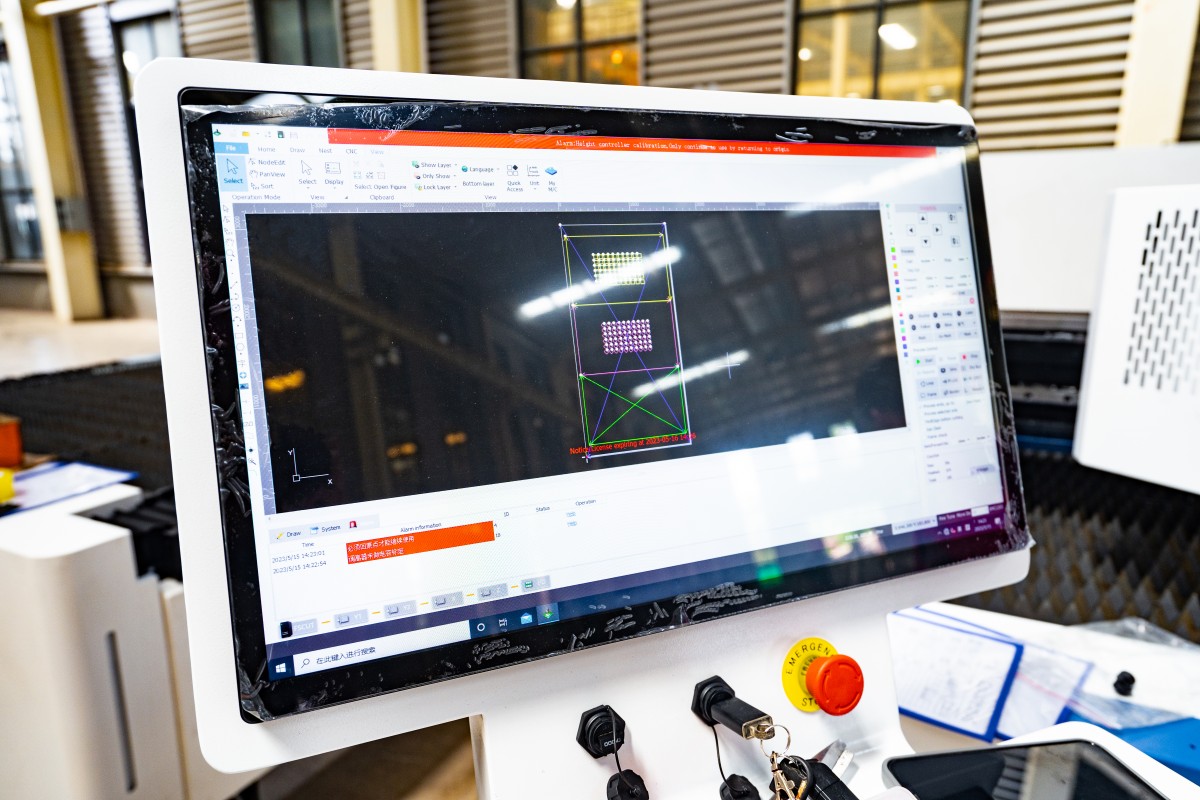
A professional workflow demands direct import capability. You must be able to drop an AI, PDF, DXF, or SVG file directly into the control software and have it interpret the vectors correctly.
- Layer Mapping: The software should automatically map colors in your design file to cutting parameters (e.g., Red lines = Cut, Blue lines = Engrave).
- Native Editing: Small adjustments—closing an open shape, welding text, or offsetting a path for kerf compensation—should happen inside the laser software. If you have to switch back to Illustrator to move a hole 2mm to the left, your workflow is bleeding time.
If a machine requires you to convert your vector files into a proprietary raster format or forces you through a complex import wizard every time you update a design, it fails the efficiency test. The goal is a seamless pipeline: Design → Import → Cut. Anything else is friction.
Phase 3: The Scenarios (Find Your Specific Situation)
Most purchasing guides fail because they treat a hobbyist in an apartment and a sign-maker in a warehouse as the same customer. They aren't. A machine that is perfect for one is a liability for the other.
Having established the technical "hard filters" in the previous section, we now apply them to the three most common user scenarios. Locate yourself below to see which specific machines survive the cut.
Scenario A: The "Side Hustle" Desktop Units (Limited Space, High Ease-of-Use)
This scenario applies to you if you are operating out of a spare bedroom or a small studio, have limited ventilation options, and prioritize "time-to-print" over raw horsepower. You need a machine that looks like a printer, not a science experiment.
The "Plug-and-Play" Contenders: Glowforge vs. xTool P2 vs. Gweike Cloud
The Glowforge Pro defined this category for years. Its "walled garden" approach is similar to Apple’s ecosystem: it is incredibly easy to use, features excellent camera alignment, and the Proofgrade materials system removes the need to calculate power settings. However, it requires an active internet connection to function. If your WiFi drops, your production stops.
The xTool P2 has emerged as the primary challenger. It matches the Glowforge in ease of use (camera positioning, autofocus) but breaks the "walled garden." It supports LightBurn software, allows for offline operation, and features a riser base for engraving taller objects—something the Glowforge struggles with.
The Gweike Cloud is the budget contender. It offers similar 50W CO2 power in a desktop form factor for significantly less money. The hardware is solid, but the software experience is less polished than its competitors.
The Trade-off: Paying for Convenience vs. Repairability
The hidden cost of desktop units is repairability. To make these machines sleek and safe, manufacturers enclose the components.
If a laser tube dies in a Glowforge, you generally cannot replace it yourself; the entire unit often must be shipped back to the manufacturer for service. This can mean weeks of downtime. The xTool P2 and Gweike Cloud offer a middle ground, allowing users to replace tubes and mirrors, though the process is more cramped and difficult than on a larger industrial unit. You are paying a premium for a small footprint; ensure your business model can sustain the potential downtime or the cost of proprietary replacement parts.
Scenario B: The "Garage Production" Workhorses (Maximum Power, Lower Cost)
This scenario is for the maker with a dedicated garage space, a dryer vent for exhaust, and a willingness to get their hands dirty. You want maximum wattage per dollar and a large cutting bed (20"x28" or larger).
The OMTech & Monport Approach: High Capability, High Maintenance
Brands like OMTech and Monport import industrial "China Blue/Red" lasers and sell them at aggressive price points. An 80W OMTech unit often costs less than a 45W Glowforge. These machines are beasts. They feature industry-standard Ruida controllers (fully compatible with LightBurn), standard parts available on Amazon, and large pass-through doors for oversized sheets.
However, quality control varies. You are not paying for a polished consumer experience; you are paying for raw iron and glass.
The "Tinkerer’s Tax": Assessing Your Ability to Align Mirrors and Swap Controllers
The "Tinkerer's Tax" is the time you will spend calibrating the machine. Unlike desktop units, these machines often arrive with mirrors out of alignment due to shipping. You must be comfortable loosening lock nuts, firing test pulses, and adjusting beam paths.
If you are terrified of high-voltage electronics or mechanical alignment, do not buy these machines. If you are comfortable with a wrench and a multimeter, these units offer the highest Return on Investment (ROI) in the industry.
Mandatory Upgrades: Chillers and Air Assists You Must Budget For Immediately
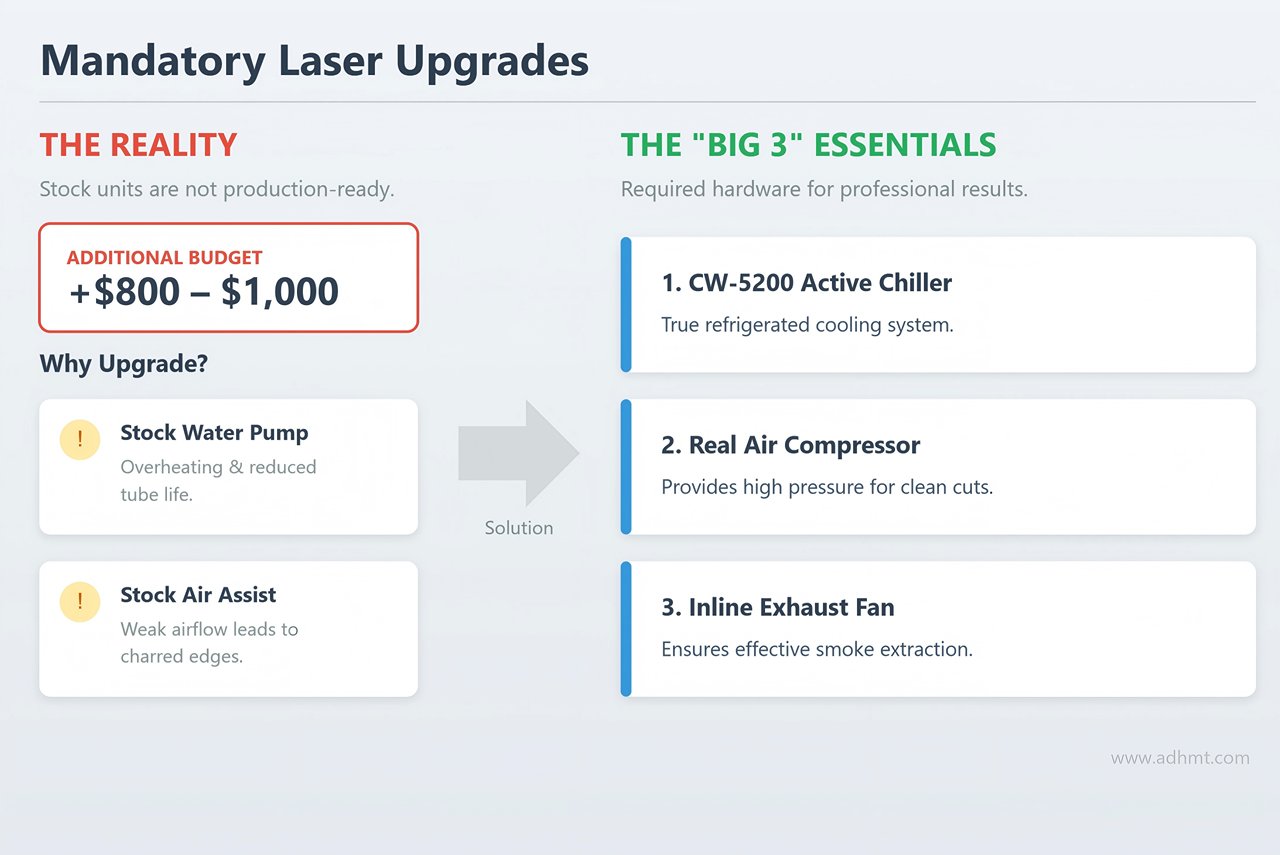
The "sticker price" on these units is a lie. The stock "water pump" is usually a simple aquarium pump that cannot keep up with an 80W tube during a long cut, leading to overheating and reduced tube life. The stock "air assist" is often a weak fan that fails to clear smoke, resulting in charred edges.
To make an OMTech or Monport production-ready, you must immediately budget an extra $800–$1,000 for:
- A CW-5200 active chiller (refrigerated cooling).
- A real air compressor (for clean cuts).
- An upgraded inline exhaust fan.
Scenario C: The Professional Workshop (Speed, Reliability, & US Support)
This scenario is for businesses where the laser is the primary revenue generator. If the machine goes down, you lose money. You need speed, precision, and a phone number to call when things break.
Stepping Up to Thunder Laser, Aeon, and Boss: What That Extra $4k Buys You
Moving from an OMTech to a Thunder Laser Nova, Aeon Mira, or Boss Laser involves a significant price jump, often $4,000 to $6,000 more for similar wattage.
You aren't paying for more power; you are paying for servo motors (instead of stepper motors), linear rails, and RF (Radio Frequency) metal tubes (in higher-end configurations). These components last longer and hold calibration better under 24/7 operation. The build quality is tighter, the wiring is cleaner, and the safety interlocks are industrial-grade.
The Speed Factor: Why Raster Performance Matters More Than Cutting Power
Novices obsess over cutting power (Watts); professionals obsess over raster speed (Inches Per Second).
If your business involves engraving tumblers, leather patches, or slate coasters, the laser head has to move back and forth thousands of times. A budget stepper motor might cap out at 500mm/s with "ringing" (wobbly lines). A Thunder Laser or Aeon with hybrid servos can run at 1000mm/s+ with razor-sharp precision. This effectively doubles your daily output. In a production shop, speed is the only metric that matters.
Local Support: The Insurance Policy That Prevents a 3-Week Parts Delay
The single biggest differentiator for Scenario C is US-based support.
If a controller board fails on a generic import, you are often navigating forums or emailing a factory in China, waiting weeks for a replacement. Companies like Thunder, Aeon, and Boss maintain US warehouses with stocked parts and employ English-speaking technicians who can troubleshoot via video call.
For a hobbyist, a three-week wait for a part is an annoyance. For a professional workshop, it is a business-ending event. That extra $4,000 is your insurance policy against silence.
Phase 4: The Final Reality Check Before Ordering
You have your shortlist. You have your budget. You are hovering over the "Add to Cart" button. Stop.
There is a difference between a machine that cuts demo files at a trade show and a machine that sustains a business for five years. That difference is rarely found in the spec sheet; it is found in the friction of daily use. Before you commit capital, you must pass your chosen machine through three final filters. These are the fail-safes that separate a profit-generating asset from a heavy, expensive garage ornament.
Maintenance Access: The 60-Second Check That Prevents a Week of Lost Work
Laser maintenance is not a "someday" task; it is a weekly requirement. Vaporized glue and wood resin build up on optics at a rate of 1–2 grams per week. If cleaning your mirrors takes 30 minutes of disassembly, you will skip it. When you skip it, the resin burns into the lens coating, causing a 30% drop in power and eventually cracking the optic.
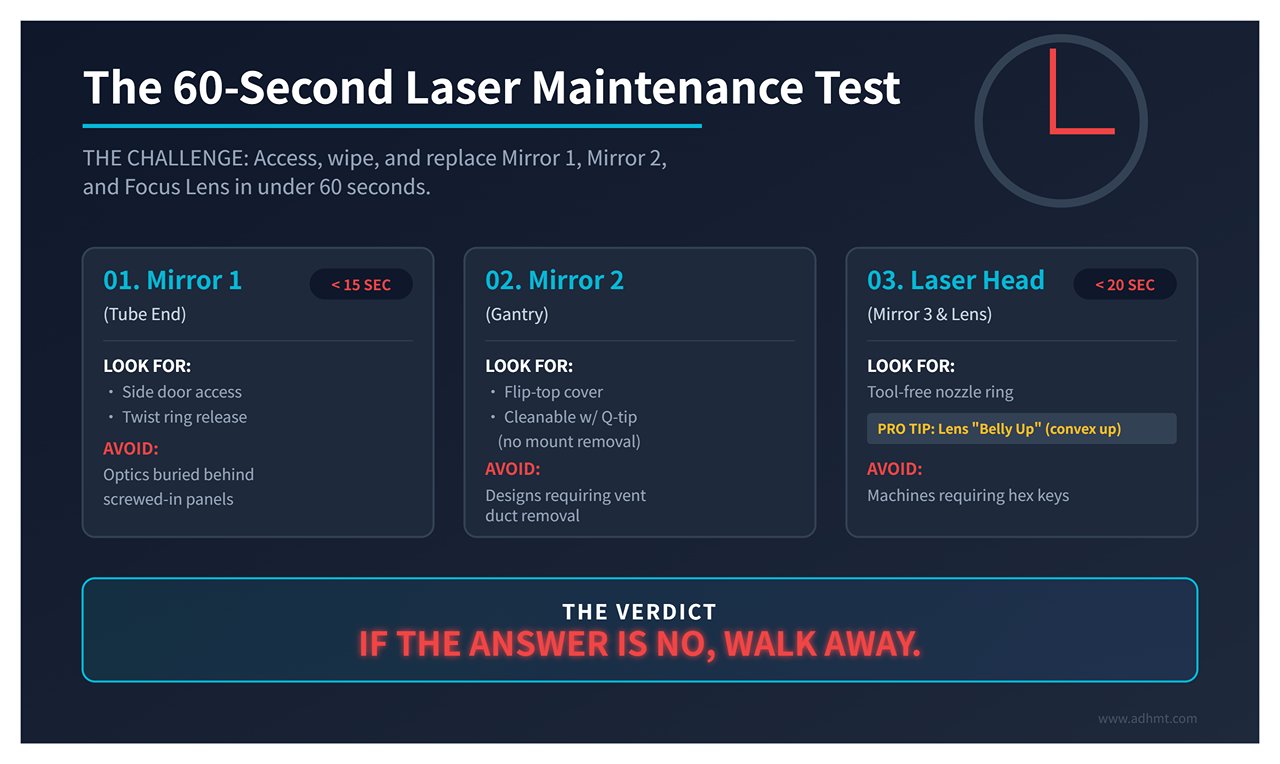
The Test: Contact your vendor or check a user video. Can you access, remove, wipe, and replace Mirror 1, Mirror 2, and the Focus Lens in under 60 seconds total?
If the answer is no, walk away.
- Mirror 1 (Tube End): You need a side door. You should be able to twist a ring and pull the mirror in under 15 seconds. (OMTech and Gweike usually pass; Glowforge often fails this, burying the optic behind panels).
- Mirror 2 (Gantry): Look for a flip-top cover. You should be able to clean this with a Q-tip without removing the mount. If you have to unscrew the ventilation ducting to see it (common in older Monport designs), you are paying a "maintenance tax" every Friday.
- Mirror 3 & Lens (Laser Head): This is the critical zone. You must be able to drop the bed, remove the nozzle ring, and catch the lens in your hand in under 20 seconds. Pro Tip: When reassembling, ensure the lens goes in "belly up" (convex side up). If the machine requires a hex key to access the lens, it fails the test.
The "Buy Nice or Buy Twice" Decision Matrix
A $3,000 machine is never just $3,000. It is a down payment on future repairs. Conversely, an $8,000 machine often costs less over a 5-year horizon. This matrix exposes the Total Cost of Ownership (TCO) hidden behind the sticker price.
Identify which column matches your shortlist candidate:
| Dimension | The Budget Build (Scenario B) | The Pro Workhorse (Scenario C) |
|---|---|---|
| Upfront Cost | $2,000 - $4,000 | $6,000 - $10,000 |
| Tube Life | 1k–2k hours (Glass CO2) | 10k+ hours (RF Metal/High-end Glass) |
| Est. Downtime/Year | 15 days (waiting for parts) | 2 days (local support/better QC) |
| Weekly Maintenance | 2 hours (manual alignment) | 30 mins (sealed optics/better rails) |
| Replacement Cost (Year 4) | $1,000+ (New tube + PSU) | $0 (Long-life source) |
| Resale Value | 40% of original price | 70% of original price |
| 5-Year TCO | $19,000+ (inc. lost billable hours) | $7,000 (low consumables) |
If you are running a hobby shop, the Budget Build is acceptable—your time is free. If you are running a business, the downtime of a "cheap" machine will cost you more than the price difference of the "expensive" one within the first 18 months.
Checklist: Be Ready to Cut Within 48 Hours of Delivery
The most dangerous time for a laser owner is the first week. If you lack the right supplies, the machine sits idle while your return window ticks down. If you don't validate the optics immediately, you own the shipping damage.
Execute this timeline to ensure you are operational—or ready to return a lemon—immediately.
Day 0: The Pre-Arrival Run (2 Hours)
- Fluids: Buy 2 gallons of distilled water (for the chiller) and 90% Isopropyl Alcohol (for optics).
- Optics Kit: Have lens paper and thermal paper (receipt paper) ready for alignment testing.
- Power: Verify a dedicated 20A circuit (110V/220V depending on unit). Sharing a circuit with a fridge or compressor will trip breakers and ruin cuts.
Day 1: Unbox & Inspect (4 Hours)
- The Shake Test: Before filling the chiller, inspect the laser tube. Look for internal cracks. If you hear tinkling glass when you carefully rock the tube, refuse delivery.
- The Leak Test: Connect the water, run the pump, and wait 30 minutes. Check the tube ends and the chassis floor.
- The 60-Second Clean: Perform the maintenance test you researched in step 1.
- The Alignment: Use the thermal paper to check the beam path at all four corners of the bed.
Day 2: Validation (2 Hours)
- The Frame Test: Run a 10mm/s vector cut on wood at 90% power.
- The Output: The edges should be golden brown, not charred black. The cut should be vertical, not slanted.
- The Stress Test: Run the machine for 3 hours. Monitor the temperature (keep it under 22°C/71°F). If it overheats or drifts out of focus, it goes back.
The Final Cut
At the start of this guide, we asked if you were building a workshop or just buying a tool. The difference isn't in the brand name stamped on the chassis; it's in the preparation of the owner.
By following this four-phase framework, you haven't just shopped for a laser. You have defined your material needs, calculated your power requirements, secured your safety protocols, and audited the hidden costs of ownership. You aren't hoping for a good machine anymore; you have engineered a successful purchase.
The research is done. The checklist is ready. It’s time to cut. And if you'd like guided assistance in matching your workflow to the right technology, don't hesitate to contact us for tailored laser system advice.
VI. FAQ
1. Can laser cutters cut metal?
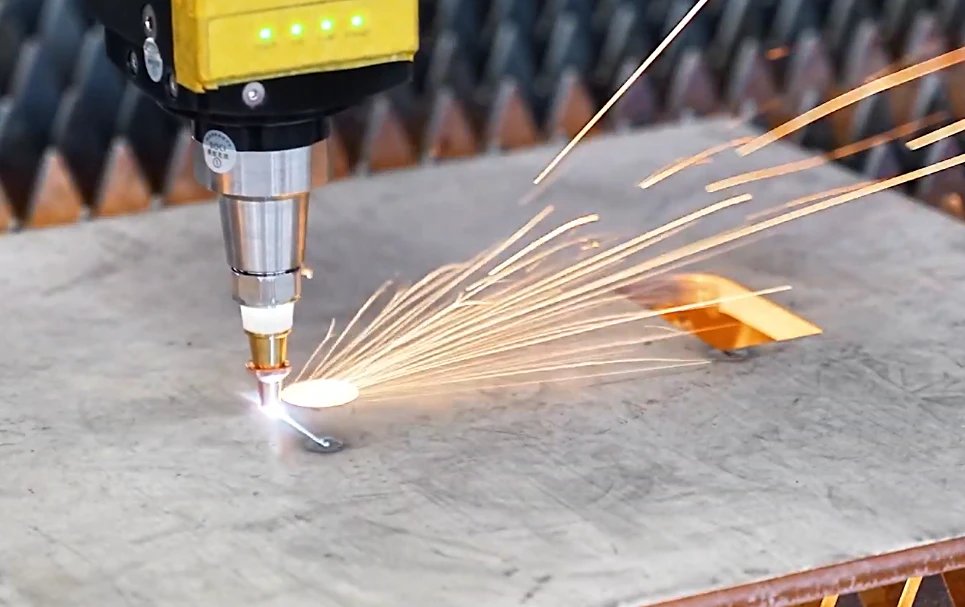
Yes, some laser cutters can cut metal, but it depends on the type of laser and its power. Fiber lasers and high-power CO2 lasers are typically capable of cutting various metals, including stainless steel, aluminum, and copper. For thicker metal sheets or more complex cutting, industrial-grade fiber lasers such as the Single Table Fiber Laser Cutting Machine are recommended.
2. What materials can a CO2 laser cut?
Common materials include wood, acrylic, leather, fabric, paper, and certain plastics. However, CO2 lasers are not suitable for cutting metals unless they are of very high power and are designed specifically for such tasks. They are also not recommended for cutting PVC or other materials that release toxic fumes when heated.
3. How precise are laser cutting machines?
The precision of laser cutting machines is one of their key advantages. High-quality laser cutters can achieve extremely fine details with tolerances as tight as 0.001 inches (0.025 mm). The precision depends on factors such as the quality of the laser beam, the stability of the machine, and the accuracy of the motion control system.







 English
  العربية
  বাংলা
বাংলা  Български
  Čeština
  Dansk
Dansk  Nederlands
  Deutsch
  Suomi
Suomi  Français
  Ελληνικά
  עִבְרִית
  हिन्दी
  Magyar
  Bahasa Indonesia
  Italiano
  日本語
日本語  Қазақ тілі
  한국어
한국어  Bahasa Melayu
  Norsk bokmål
  فارسی
فارسی  Polski
  Português
  Português do Brasil
  Română
  Русский
  Српски језик
  Slovenčina
  Español de México
  Español
  Svenska
  Kiswahili
  தமிழ்
தமிழ்  Türkçe
  ไทย
ไทย  Tagalog
  Українська
  Tiếng Việt
  اردو
اردو  简体中文
简体中文  香港中文
香港中文  繁體中文
繁體中文